Appointment booking bot in Telegram: how it works
A salon administrator spends half the day answering the same questions: is there a slot on Saturday, how long does colouring take, can I see a different stylist. In the evening and at night nobody answers them, and some people book wherever they got a reply first.
A booking bot takes this routine off the administrator. The client picks the service, the specialist and a free time slot, and gets a reminder with buttons the day before the visit. Below we look at how such a bot works inside, where it usually breaks and what to plan for before ordering one.
What a booking bot can do
Most of these bots offer almost the same set of features, and the difference lies in how deeply the bot is tied to the business's schedule.
- Shows services with price and duration.
- Offers a specific specialist or anyone who is free.
- Lists free slots for the chosen day.
- Takes a name and phone number and creates a booking in the calendar.
- Sends a reminder about the visit and accepts a confirmation or cancellation.
- Notifies the administrator about new bookings and cancellations.
For the client it is five taps instead of a chat with the administrator. For the business it is a calendar that fills itself and needs no phone calls during working hours.
A request or a booking into a free slot
In practice there are two kinds of booking bots, and the amount of work behind them differs severalfold. The first collects a request with the service, a convenient day and a phone number, after which the administrator checks the calendar and confirms the time manually. It is an ordinary lead capture bot with a visit reminder added.
The second kind books the client by itself. It sees the specialists' schedules, knows how long each service takes and shows only time that is actually free. The client gets a confirmation straight away, and the administrator learns about the booking from a notification. This bot needs an integration with the calendar and an admin panel, so it takes longer to build.
Starting with requests makes sense when bookings are few and the schedule often changes by hand. Booking into free slots pays off where the administrator cannot keep up with messages during the day and clients write in the evening.
Where the bot gets free time from
The hardest part of the bot is invisible from the outside. To show a free slot, it needs the specialist's working hours, the length of the service and every booking already made for that day.
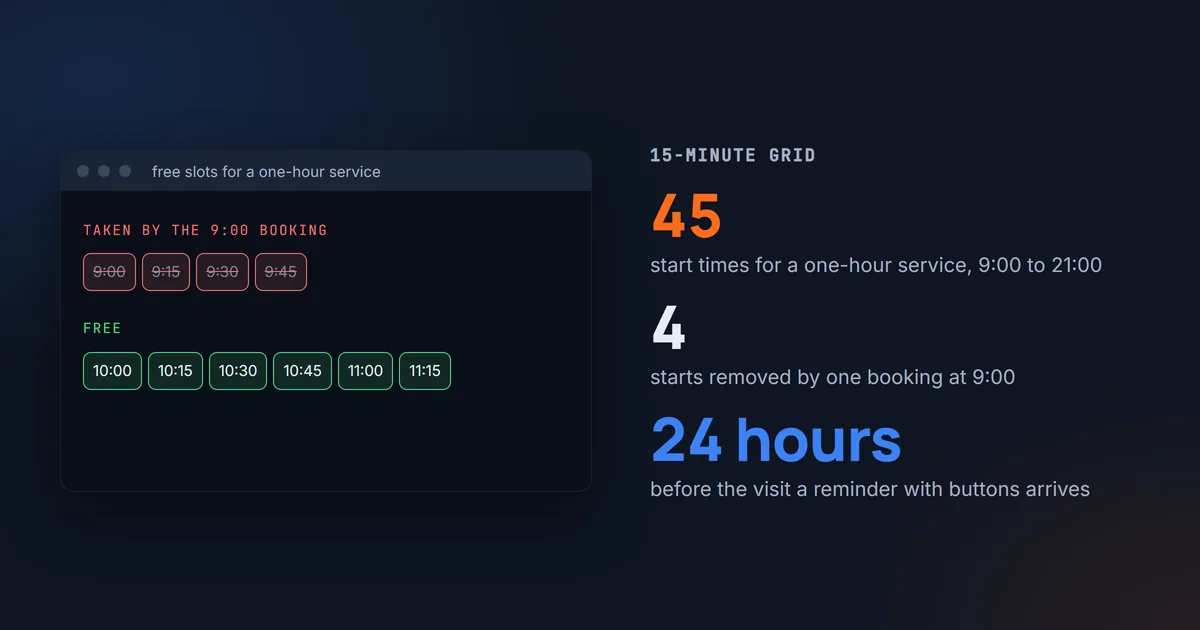
Slots are calculated on a grid, and when we built booking for a beauty salon, we chose a 15-minute step. With a working day from 9:00 to 21:00, a one-hour service gets 45 possible start times. A single booking at 9:00 removes four of them at once, because starts at 9:00, 9:15, 9:30 and 9:45 all overlap the taken hour.
Sometimes the specialist is free while the place is taken, since a chair, a room or a bay is a resource too. Overlaps are checked both for the specialist and for the place. Otherwise two specialists will book clients into the same room at the same time, and nobody will find out until they meet at the door.
A separate case is two people who choose the same slot in the same minute. While each of them was typing a phone number, the slot looked free to both. That is why the time is checked again at the moment the booking is saved, and the second client sees a message that the slot has just been taken, along with an updated list.
If branches are in different time zones, the booking time is stored together with the zone. An error of one hour is the most common one here, and the result is a client at a closed door while the specialist expects them an hour later.
Reminders and booking confirmation
A reminder the day before helps against no-shows, and a bot handles it more conveniently than SMS. The message costs nothing, arrives in the same chat where the person booked, and can be answered with a single button.
In our salon booking the reminder goes out 24 hours ahead with two buttons, "Confirm" and "Cancel". A cancellation frees the slot at once, and other clients can see it. The booking keeps a mark that the reminder has already been sent, otherwise after a restart the bot would send it a second time.
Telegram has a rule that breaks many plans. A bot cannot write to a person first until that person has opened the bot and pressed "Start". So a reminder through the bot will reach only those who booked through it or have opened it at least once.
A client from the calendar is linked to the chat by phone number. The bot asks the person to tap "Share phone number" and compares the number with the database by its last ten digits. That way the same number still matches whether it was entered with a country code or with a leading zero.
If the person has blocked the bot, the reminder will not reach them. Such a booking is worth marking. Then the bot will not keep retrying, and the administrator will know to call this client instead.
Telegram or a booking form on the site
Not every client uses Telegram, and some will not want to install it for the sake of one booking. Putting booking into Telegram alone means losing some of the people who would have booked through the site.
The second entry point is a booking form on the website. It works without any messenger, but the only way to send a visit reminder from it is SMS or email.
The most reliable setup keeps one booking core with the schedule, the slots and the calendar. Several entry points connect to it: a Telegram bot, a form on the site and, later, other messengers. The client books wherever is convenient, and the slots stay the same in every place.
If bookings already live in an online booking service
Many salons already work in an online booking service and do not want to move their calendar. In that case the bot becomes one more entry point into the service. It takes free slots and creates bookings through the API, while the schedule and the client base stay where they were.
Before ordering, check whether your service has an open API and on which plan it is available. If there is no API, the bot will only be able to collect requests, and the administrator will still confirm the time.
When there is no calendar at all, the bot keeps one itself. Then it needs an admin panel where the administrator sees the day by specialist and can edit bookings by hand when needed.
An AI administrator when buttons are not enough
Buttons work well while people are willing to press them. Some clients write a whole sentence straight away, something like "can I see Anna tomorrow after six for a haircut?", and an AI administrator handles such a request. The model understands the sentence, and the booking itself is made by the same code as the buttons: it checks the slot, creates the booking and sends the confirmation.
The main rule here concerns security. The model does not decide whom to book or whose booking to cancel, because the bot takes this data from the chat itself. So a person can only book or cancel for themselves, and asking in their own words to cancel someone else's visit will not work.
AI has its own price, since every message is paid for as a request to the model. These costs are estimated in advance, and we cover them in more detail in AI bot in Telegram. If clients are happy booking with buttons, the AI administrator can wait until the second version.
How to create a booking bot yourself
A search for "create a booking bot" often means wanting to build it with your own hands in a bot builder. For a single specialist with a fixed list of services, that works. A bot made of ready blocks comes together in an evening, and the calendar lives on the platform.
The ceiling appears quickly. Several specialists with different schedules, rooms, branches, a link to your accounting and reminders with buttons are things builders handle with difficulty or not at all. We cover how to choose between a platform and your own code in Website builder or custom code.
How long development takes
A lead capture bot with a menu, step-by-step questions and a notification to the administrator takes 5 to 7 days. A bot that books into free slots by itself, sends reminders and works with an admin panel or an outside service takes 2 to 3 weeks.
The price depends on the scope and is calculated after the task has been reviewed. It is affected most by the choice between your own calendar and an outside service, the number of booking entry points and the AI administrator.
What to prepare before talking to a developer
- A list of services with duration and price.
- The specialists and their schedules, including days off and breaks.
- Places that cannot be taken twice, such as chairs and rooms.
- Cancellation rules, meaning how many hours ahead a client can cancel without a call.
- Where bookings are kept now and whether the service has an API.
- Who will change the schedule after launch.
With this list the first conversation will go faster, and the estimate will rest on your own data. If some item is missing so far, that is useful to know too, because it will have to be settled before work starts.